Forgot your password?
Click
here to reset it
Join
How To Connect
-
Download your viewer of choice. We recommend Firestorm which you can download
Here
-
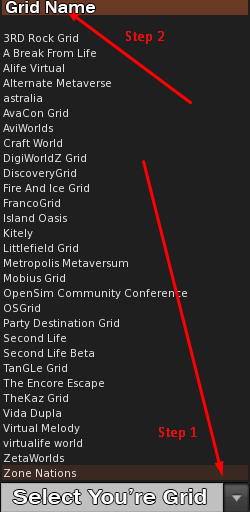
"Step 1" Choose the down arrow on Grid: "Step 2" Select LinkUp as seen in the image below.
-
If you do not see the option in the image below please skip ahead to step #7.
-
If you do "Not" see LinkUp on the list please follow the steps below 1 to 6.
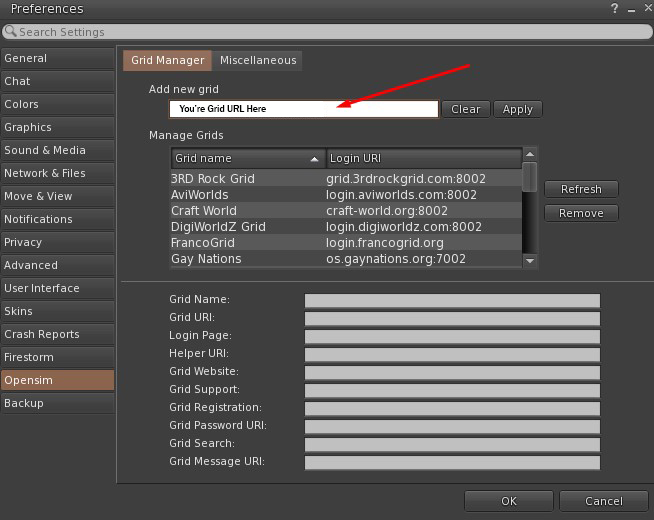
- Go to "Viewer" and then "Preferences" or (CTRL + P).
- Select the "Opensim" tab.
-
Then in the field of "Add new grid" put the URI -> login.linkup-grid.com:8002
- Click "Apply" and then "OK".
-
If you do not see the opensim tab on the left in the photo below, skip ahead to #7 then go back and repeat 1 to 6.
-
Once you have created the avatar account in the page
https://linkup-grid.com/register,
enter your first and last name in the field, your password, and in the "Grid" section select "LinkUp".

-
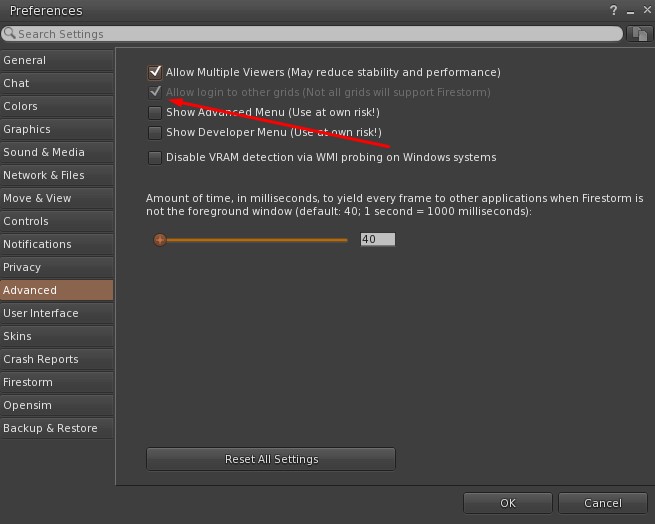
If the "GRID" option does not appear to select the desired grid, go to "Preferences" tab "Advanced" and check the "Allow login to other grids" option, as shown below, then go back and repeat steps 1 to 6.
Click to add to viewer